Showing posts with label vinyl. Show all posts

Friday, August 4, 2017

Teacher Supply Box

Next week my grandson starts first grade.  He's come for his last week day visit for a while and we've been doing some crafty things.  I saw this idea today online and we decided to make a supply box for his new teacher.

I placed a piece of paper inside so the lettering would be more visible.


View from the top.
The box is filled with items some of the students may need and not have.  Essentials such as pencils, pens, glue sticks, erasers, etc.  Then we added a few pieces of chocolate candy as emergency teacher fuel!

Sunday, April 16, 2017

Decorative Kitchen Towels


Income tax season is coming to an end (finally) and today I spent some time crafting.  My work schedule has been brutal the past few weeks so crafting hasn't been on my mind much.

After seeing some decorated kitchen towels online, I did some simple files in Make The Cut software and cut them from heat transfer vinyl.  The kitchen towels are flour sack type purchased from WalMart.  I preshrunk them before applying the designs.

I gave the women at the office the one with a rolling pin design.  We're all exhausted and trying to make it through the next few days so it's appropriate.

Tuesday, December 16, 2014

Monogrammed Ring Catcher Dishes

I can post the photos now that these have been given to my friends.  The little dish is 3" square, white ceramic, found at Pier 1.  If you go looking for them, ask for dipping sauce bowls and the clerk should take you right to them.  When I asked about them, the clerk told me I was the second person that day buying them for ring catchers.

 Samantha font was used for the letters.  The letters measure proximately 1 3/4" high, cut out of Oracal 651 metallic gold vinyl.
These were gifts for the ladies in the wine group.  We had a get together last night and I passed them out to everyone.

Friday, July 4, 2014

Wizard of Oz Frame

With some help from a Facebook friend, I located and traced the image of the ruby slippers.  The frame is only 5 x 7 so the cut outs are pretty small. The frame is for a friend who likes the Wizard of Oz movie and invited us to a cookout on July 4th.

Hope she likes it!

You can see the clips holding the glass in place.  I'll be bending them back and applying a bead of hot glue along the inside edge to hold the glass.

***EDITED TO ADD***         I added a piece of blue gingham printed cardstock behind the glass since Dorothy's dress was blue gingham.  It made the design stand out better.

Tuesday, December 24, 2013

Almost Floating Frames

A holiday catalog inspired me to make these frames.  Since floating frames are rather expensive, I decided to just make my own.

All these frames came from either the Dollar Tree or Dollar General Store.  The largest is 8" x 10" and the smallest is 4" x 6".  I removed the cardboard backing and then put a line of hot glue around the edge of the glass on the back side to hold it in place.

The issue with removing the cardboard backing was that also removed the metal hanging loops.  When I selected the frames I made certain the edge of the frame was wide enough to add my own sawtooth hanger.

The letters were cut from Oracal 651 vinyl and mounted on the surface of the glass rather than reversing the image and placing it on the back side of the glass.  I did it this way so that none of the adhesive on the larger letters would be visible from the front.


Monday, November 18, 2013

Biker's Sign

I saw this saying on a t-shirt and thought it would be perfect to utilize the last 8" x 10" floating frame that I bought for the craft show.  It's laying on a sheet of white paper so the lettering would show up in the photo.

The font is Antigoni Medium.  I haven't decided yet if I'll put anything on the face of the white frame.  After I look at it a day or two, I'll decide what it needs.


This is the largest vinyl cut out that I've applied in a single piece.  Thanks, Shirley,  for reminding me to use registration marks!

Floating frames are fun to make.  Next time JoAnn's has them on sale for 60% off, I'm going to pick up a few more to have on hand.

Added sort of a checkerboard onto the frame.  I think I like it!


Wednesday, November 6, 2013

Miniature Suitcases

I have a set of three tiny suitcases.  This one measures just 11" x 7" and it's the largest of the three.  I used  Challenge Contour font and added some swirls with hearts using Oracal 651 white vinyl.  Then I added two Christmas floral picks and a wired ribbon bow.  This is another project for the craft show next month.


The medium sized one is 5 1/2" x 9 3/4".  I used Partridge font for the lettering and just added a tulle bow on top. The reindeer and snowflakes are Silhouette files.

The smallest one is 7 1/4" x 4 1/2".  I used Partridge font for the lettering and the candy canes are Silhouette files.


Friday, November 1, 2013

Bless The Food Floating Frame

This is the largest vinyl project I've done.  The frame is 11" x 14".  I used Lobster 1.4 font and a corner decoration found online.

Doing a floating frame is pretty easy.  You don't have to mirror your lettering since it's applied onto the surface of the piece of glass in the rear.

I had tried to use a much more elaborate font to do this and my machine was just not cooperating this evening!  After ruining a couple of pieces of vinyl, I gave up and changed the font.

Wednesday, October 23, 2013

A Quick Christmas Cake Carrier


I'll add a red and green tulle bow onto the carrying handle to dress it up a little bit more.  This came from the Dollar Tree so I'm thinking it's going to be a single use item, but it's cheaper than a holiday tin!

Motorcycle Frame For A Guy

This is my first floating frame vinyl project.  I used DomCasual ID font and a motorcycle clip art image found online.  This is a large frame--11" x 13".  It will make a nice gift for a guy who loves his bike.

I like that you can put your design on the bottom layer of glass and not have to reverse the images. It sure makes it simpler to assemble!

Tuesday, October 22, 2013

Labrador Silhouette Frame

The cat silhouette frame turned out so well that I made a frame with a Labrador dog too.  Using Make The Cut, I combined three clip art images found online.  I needed something more masculine for the craft show.  The only other masculine things I'll have are some mugs.

Cat Silhouette Frame

Of all things, a $39.00 night light that I saw in a catalog inspired this project.  The cat silhouette and tree branch are clip art images found online.  They were imported into Make The Cut software, resized and welded to create the silhouette.

The vinyl I used for the silhouette is matte finish and applied to the glass surface.  The background paper is by Pink Paisley.

I believe I'll put a soft, black bow centered on the top edge of the frame and leave the ribbon tails hanging down on either side.  That should finish this quick project up!

"Frozy Frame"

I've spent more time getting this frame done than any of my other vinyl projects.  The dimensions of the frame made it difficult for me to decide just what to do with it.  I thought the sentiment was cute and wracked my brain trying to come up with a layout for it.  This is why I don't design original pieces, it just takes me too long to put the pieces together. 

The icicles and snowflakes on the burlap background are cut from Mica Paper.  I etched snowflakes onto the surface of the glass with my blasting cabinet and added the sentiment on the inside of the glass.  The letters are cut from silver metallic vinyl with black shadows.

This photo was taken before I had completely assembled the frame.  The gold cords on the jingle bells were removed, of course!

Since the frame is stark white, I'll be adding a large bow around the outer edge.  It's still several weeks until the craft show so I'll wait to put bows on any of the items I'm taking so they won't get crushed.

Saturday, October 19, 2013

Jingle Bell Frame

Some days everything you do just goes so smoothly, projects turn out just the way you want, everything cuts fine and your software never shuts down.  Then there are days like today.  ***sigh***

I decided since DH was out of the house, I'd make a shadow box frame with a vinyl saying and it is one of those days that nothing seemed to go right.  I fought with my vinyl lettering for about 2 hours before I realized  what was wrong and fixed the problem.

Silhouette America ran a sale on vinyl and I ordered eight rolls because of the price.  I hate that vinyl!  The backing won't stick to my cutting mat.  I still haven't found the right settings to get a kiss cut and it will not stick to my transfer paper well enough to pull the vinyl off the backing!  One positive thing about it is that it does weed quite easily as long as the shapes cut cleanly.

After working with the Silhouette vinyl for over an hour, I gave up and used my Oracal 651.  It cut like butter and went on easily.

The lettering didn't show up well in the photo so I added a black shadow to the silver lettering I like the way this frame turned out.  Hope someone likes it when I put it on display at the craft show too!

 The shadow was just what it needed for the silver to show up well.

Placing Designs On Charger Plates

After I posted the first few charger plates I'd made, I started getting questions on how I sized my designs for the center and how I was able to space the shapes on the outer edge.

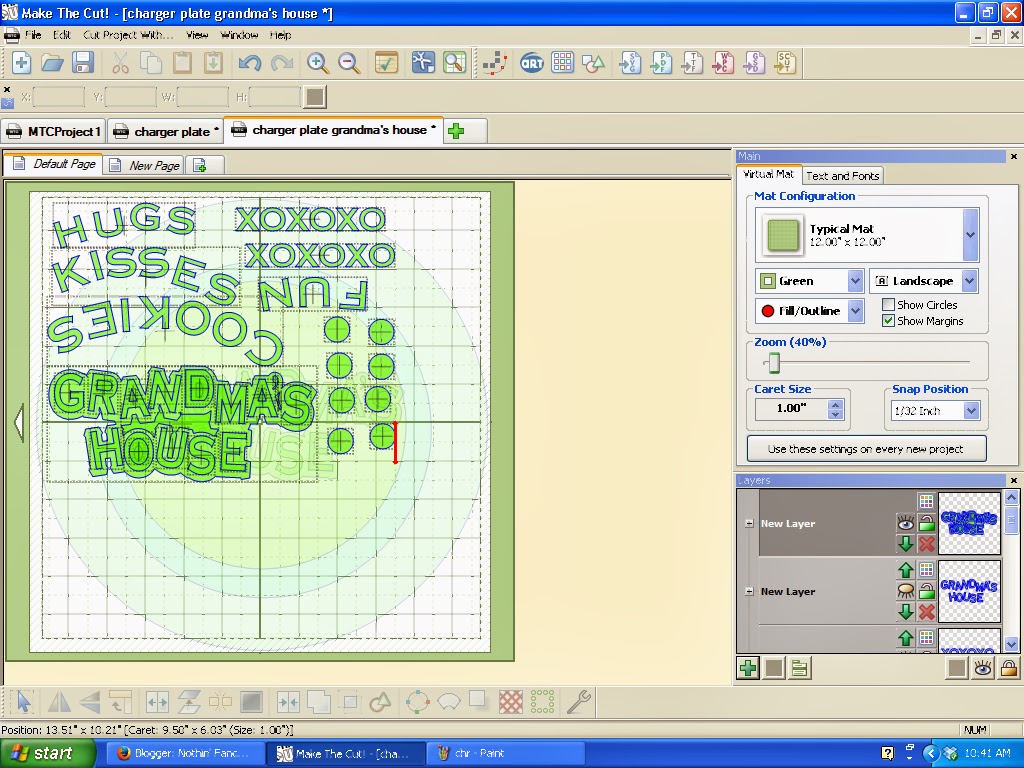
The creator of Make The Cut software does a weekly webinar where he answers questions asked on the MTC forum.  Last year, one of the big questions was "how do I curve text to fit a circle".  Within his discussion and demonstration in the webinar was the suggestion to create a template for a charger plate.  That way you can see exactly what size your images need to be cut and where to place them on the plate.

I use this template:

I made three different colored circles.  One for the outer edge, one for the ridge around the center space and then one for the center.

Once I get all the shapes where I want them on the template, I'm ready to cut.

Doing a cut preview means I can zoom in and be certain all the shapes will cut the way I want.  Sometimes I'll overlook welding letters in a script font and have tiny cuts that I don't want. By doing the preview I have a chance to make any changes I need.


The next step is to group all the shapes closer together on the mat and get ready to cut them.  I cut all these from a single color so I just put them close together to save vinyl.  Once I've finished cutting, I close the file without saving it and reopen it to see how it looked originally so I know where to place the shapes.

This is how I place my cut outs on the plates.  I lay a ruler across the center of the plate.  Then place a second one perpendicularly to the first.  I mark four places on the outer edge of the plate with blue painter's tape for reference.

*** I am known as the "Glue Booger Queen" to my crafting friends.  You can see why by looking at my rulers in the photo.  There's adhesive smeared all over them!***


I placed a piece of white cardstock underneath the rulers so you can see that I lined up the vertical one on the 6 1/2" line of the horizontal ruler.  My plates are 13" in diameter so that's the middle.

Once you get these four points marked, it's simple to place markers in between for spacing your cuts on the outside edge of the plate.

This may not be the most efficient way of doing the plates, but it's a method that works for me. 

Friday, October 18, 2013

Grandma's House Charger Plate

Cornerstone is the font I chose for this charger plate.  I love how easy it is in Make The Cut to create a shadow layer for text!  So much easier than struggling like I used to while using a Cricut and Design Studio software!

This is a design that I made myself...I know, don't faint!  I didn't copy it from something I saw online!


Wednesday, October 16, 2013

Green and Gold Charger Plate

Lobster 1.4 font was used for the center sentiment.  The wheat is from the Silhouette store, file #50134. I modified it slightly in my software so it would fit well on the outer border of the plate.

Snow Tree Charger Plate

This morning I saw another charger plate that had the snow tree in the center on it.  It's from the Silhouette store.  It cuts cleanly, but getting the tiny swirled branched onto the transfer tape and then onto the plate was a little tricky.  Even after washing the plates sometimes the vinyl just doesn't want to stick down.

I added a couple of extra birds to the design and then dotted the swirls on the outer rim with red Stickles.  We're not supposed to use Stickles on our Operation Write Home cards any longer so I need to use them up!


Snowman Charger Plate

I wish I could remember where I got the snowman and the words used on this plate.  It may have been a file that was shared on the Make The Cut forum last year.  The original design had more intricate snowflakes on it; I changed them to a simpler one that would cut faster and be easier to weed.

***Edited:  Thanks to Lillie Charleston, I now know that the file was placed on the MTC board last year by Brianna.**** 

Danita Kinney messaged me and gave me the source for the original snowman   http://oodlesofdoodles26.blogspot.com/2011_12_01_archive.html


Monday, October 14, 2013

Celebrate The Season Charger

Gold metallic vinyl was used to cut these shapes from the Silhouette store.